IPTV EPG Not Working? How to Fix Missing TV Guide on Firestick
Is your IPTV EPG not working on Firestick, Android TV, or another streaming device? A missing TV guide can make it diffi...
Read Article
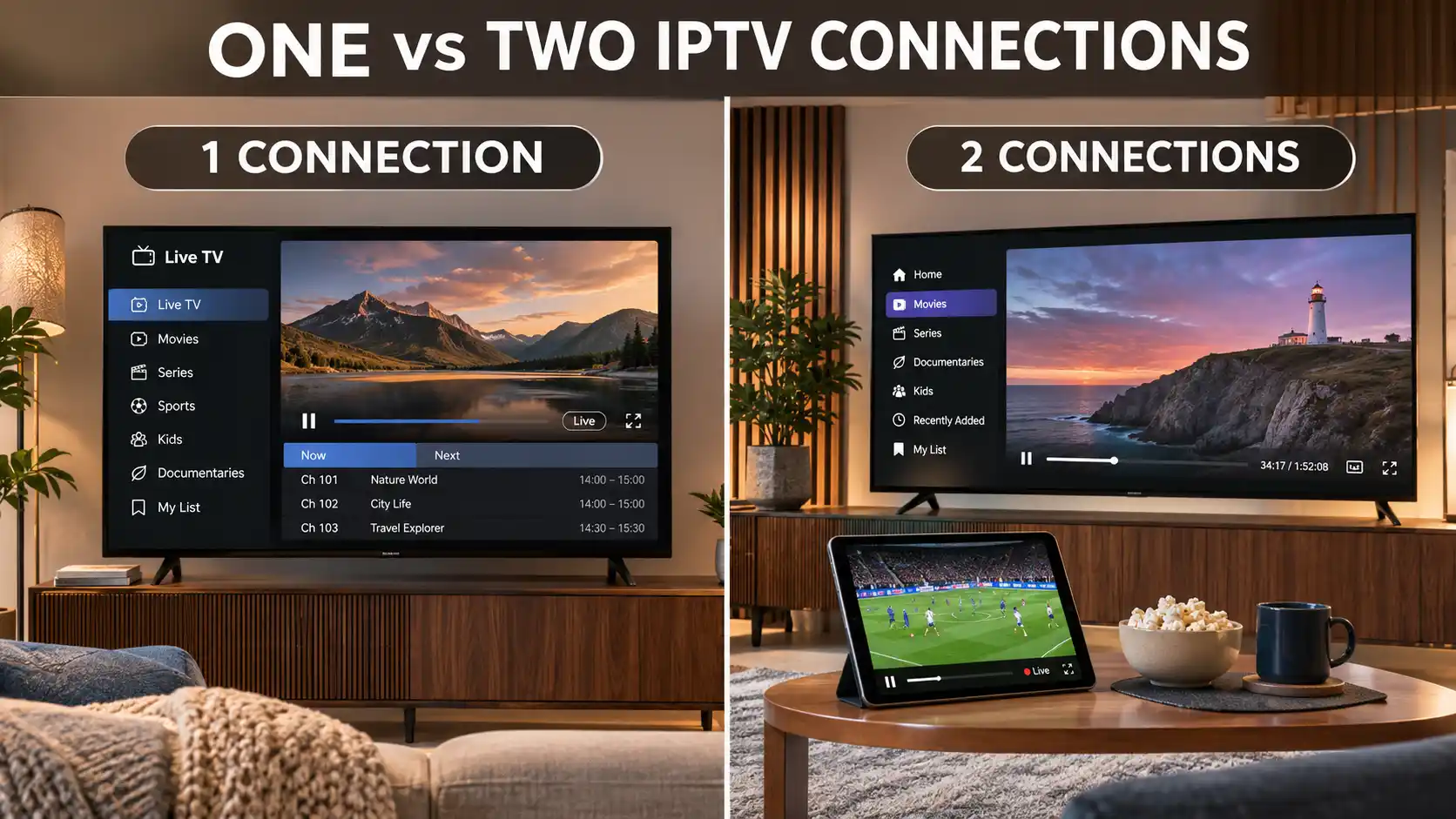
Choosing between one and two IPTV connections is an important decision when selecting a television streaming subscription. While a single connection may be suitable for someone who watches alone, a two-connection plan can offer greater flexibility for households where two people want to stream different content at the same time.
However, many viewers confuse the number of devices they own with the number of simultaneous streams their subscription allows. Having two Smart TVs, a Firestick, a smartphone, or an Android TV box does not automatically mean that you need two IPTV connections.
The right choice depends on how many streams you want to watch simultaneously, your household viewing habits, the provider's device rules, and your internet connection.
In this guide, we explain the difference between one connection and two connections IPTV, how simultaneous streaming works, which option fits different households, and how to compare subscription costs before purchasing.
Whether you live in the United States, United Kingdom, Ireland, Canada, Australia, New Zealand, South Africa, or another country, these practical examples can help you make a more informed decision.
One IPTV connection generally allows one active stream at a time. It may be enough if you watch on a single screen or switch between devices without streaming simultaneously.
Two IPTV connections generally allow two active streams at the same time, subject to your provider's subscription rules.
For example, one person could watch television in the living room while another watches different programming on a tablet or second Smart TV.
Two connections do not automatically provide faster internet, better picture quality, or access to additional channels. They primarily affect how many streams your subscription permits at once.
A one-connection IPTV plan normally permits one active playback session at a time.
This means that a customer can watch the content included in the subscription on one supported device, within the provider's usage conditions.
Some providers allow customers to configure the same account on several compatible devices and switch between them. Other providers may restrict the number of registered devices or require device-specific activation.
For this reason, one connection should not be interpreted as unlimited device registration.
Imagine that you watch television on your Smart TV in the evening but occasionally use your smartphone during the day.
If only one device streams at any moment, a one-connection plan may be suitable, provided your provider allows switching between those devices.
If both devices start playing content simultaneously, the account may exceed its permitted connection limit.
A two-connection IPTV plan generally supports two active streams at the same time under the provider's specified conditions.
This option may be convenient for families, couples, and other households where two people prefer watching different programs simultaneously.
For example, one person may watch a live football match on the living-room television while another watches an authorized movie or television program on a separate device.
The exact permissions depend on the subscription. Two connections do not necessarily mean that an account can be shared between different households, countries, or unrelated users.
The following comparison explains the practical differences between the two options.
| Feature | One IPTV Connection | Two IPTV Connections |
|---|---|---|
| Simultaneous Streams | Usually one active stream. | Usually two active streams. |
| Best Suited For | Individual viewers or one active screen. | Two viewers or two active screens. |
| Multiple Device Registration | Depends on the provider's rules. | Depends on the provider's rules. |
| Two TVs Playing at Once | Normally not permitted. | Generally supported within plan conditions. |
| Switching Between Devices | May be allowed when no other stream is active. | May be allowed within device restrictions. |
| Internet Bandwidth | Must support one active video stream. | Must support two active video streams. |
| Streaming Quality | Depends on source, network, app, and device. | Depends on source, network, app, and device. |
| Subscription Cost | Usually the base price. | May cost more than the base price. |
| Recommended Use | Personal viewing. | Simultaneous household viewing. |
The comparison describes common IPTV subscription arrangements. Always check the specific terms of the service you are considering.
One of the most important distinctions is the difference between having IPTV installed on multiple devices and using multiple active connections.
Multiple devices refers to the equipment on which you may want to access a compatible IPTV application.
These devices could include:
A provider may permit an account to be configured on more than one device, but account activation and registration rules can vary.
Simultaneous connections refer to the number of active streams that can operate under the subscription at the same time.
For example, a household may own four compatible devices but require only one connection if everyone watches at different times.
Another household may own only two televisions but need two connections because both screens are frequently active simultaneously.
The number of devices you own is not necessarily the number of IPTV connections you need.
For more information about device compatibility, explore our IPTV Multi-Device Streaming Guide.
This is one of the most common questions customers ask before purchasing an IPTV subscription.
The answer depends on whether the two televisions will stream simultaneously and on the provider's device rules.
Suppose you have a Smart TV in the living room and another television in the bedroom.
You watch television in the living room during the day and switch to the bedroom at night.
If only one screen is streaming and your provider allows account use on both televisions, one connection may be sufficient.
Imagine someone watching football in the living room while another person watches a movie in the bedroom.
Both televisions are actively streaming at the same time.
In this situation, a two-connection option is generally more appropriate, assuming that the provider permits the intended household use.
Even if both televisions show the same content, they may still count as two active streaming sessions.
Watching the same channel does not automatically reduce the number of connections required.
Check the provider's rules before assuming that identical content counts as one connection.
The following examples can help you identify the right subscription option for your household.
| Household Situation | Likely Suitable Option | Reason |
|---|---|---|
| One person watching on a single Smart TV. | One connection. | Only one active stream is required. |
| One person switching between TV and smartphone. | One connection, if device switching is permitted. | The devices are not streaming simultaneously. |
| Couple watching different programs at the same time. | Two connections. | Two active streams are required. |
| Family using a living-room TV and bedroom TV simultaneously. | Two connections. | Both televisions are playing content at once. |
| One viewer using Firestick and another using a tablet. | Two connections when both stream simultaneously. | Each device creates an active viewing session. |
| Household with three active televisions. | Ask about three or more connections. | Two connections may not cover three simultaneous streams. |
| Viewer installing IPTV on several devices but watching only one at a time. | Potentially one connection. | Depends on device registration and switching rules. |
These recommendations are general examples, not a guarantee of what a particular provider permits.
If you mainly watch content through one Smart TV, a single connection may meet your needs.
For example, someone using a Samsung television in the living room might not need to purchase additional connections if no other device streams simultaneously.
However, families using multiple televisions at the same time should consider whether their subscription allows the necessary number of active streams.
Before subscribing, make sure your television supports the recommended player and login method.
Read our Best IPTV for Smart TV: Samsung, LG and Android TV Setup Guide for installation and compatibility information.
Amazon Firestick is a convenient way to add compatible streaming applications to a television.
A single Firestick playing one stream generally requires one active connection.
If you use two Firestick devices on separate televisions at the same time, you will typically need two permitted simultaneous streams.
The same principle applies when one person uses Firestick and another uses a supported smartphone or Android TV device.
Remember that installing a player on two Firesticks does not automatically authorize simultaneous playback.
For setup information, visit our How to Install IPTV on Firestick in 2026.
Two connections can make a household's viewing arrangement more flexible when family members want to watch different content at the same time.
For example:
However, a family with several devices does not necessarily need multiple connections if everyone watches together or uses the service at different times.
Choose the connection count based on actual simultaneous viewing rather than the total number of devices in the house.
Two connections primarily increase the number of streams permitted by a subscription.
They do not automatically increase picture resolution, internet speed, server responsiveness, or overall video quality.
If one device suffers from weak Wi-Fi reception or application problems, purchasing a second connection may not resolve the issue.
Similarly, if your internet connection cannot support two streams consistently, the household may still experience buffering even when the subscription permits simultaneous playback.
For technical guidance, read our Premium IPTV Streaming: Speed, Stability and Device Performance Guide.
Two simultaneous IPTV streams usually require more total internet bandwidth than one stream.
The exact requirements depend on the available content, video bitrate, compression, resolution, and the performance of the home network.
For example, two high-bitrate video streams may place greater demands on a connection than two lower-bitrate streams.
When comparing plans, consider:
A practical way to evaluate your home network is to test the types of authorized streams you intend to watch simultaneously.
Do not assume that a fast internet speed test guarantees stable playback from every streaming source.
Attempting to use more simultaneous streams than a subscription allows can cause access problems.
Depending on the provider, the second session may be rejected, an existing session may be interrupted, or the account may display a connection-limit error.
However, buffering and freezing can also be caused by network instability, application errors, device limitations, or content delivery problems.
If playback stops when another device begins streaming:
Do not purchase an additional connection until you have confirmed that simultaneous use is actually causing the problem.
For further troubleshooting, read our How to Fix IPTV Buffering and Freezing on Any Device.
The total cost of an IPTV subscription depends on the plan duration, number of permitted connections, and current provider pricing.
In many cases, a one-connection option is the base subscription, while additional simultaneous connections may increase the total cost.
IPTVcrowds displays base subscription prices for one connection and provides a connection-selection field in the ordering process.
Before placing an order, select the required connection count and review the displayed total or confirm the final amount with support.
Important: Do not assume that a two-connection subscription costs exactly twice the one-connection price. The additional charge depends on the provider's current pricing rules.
At IPTVcrowds, customers can review the available subscription durations and provide details about their preferred streaming setup.
The checkout includes fields for device type, country, and number of connections.
Choose the trial or subscription period that fits your requirements.
Review the advertised base price before proceeding.
Use the Connections field to specify the connection option you want.
If two household members will stream at the same time, ask whether the two-connection selection is appropriate for your intended setup.
Check the total associated with your selected subscription and connection count.
If the additional-connection price or any subscription condition is unclear, request confirmation from support before paying.
Provide accurate information about the device you intend to use and the country where you will access the service.
This helps the support team review compatibility and explain the available setup options.
The IPTVcrowds order page currently explains that customers submit their details and continue with the support team through WhatsApp or email.
Payment instructions and order confirmation are provided through the applicable support process, rather than through an immediate online payment on the checkout page.
Confirm the price, connection allowance, content availability, and terms before completing the purchase.
If you are unsure how many simultaneous streams you need, starting with one connection may be a reasonable option when you usually watch alone.
You can then assess your household's viewing habits before asking about additional connections.
However, do not assume that every subscription can be upgraded immediately or that unused time will automatically be credited.
Ask the provider whether connection upgrades are supported, how pricing is calculated, and whether changes are available during an active subscription.
If you already know that two people will watch simultaneously, selecting an appropriate two-connection option from the beginning may be more convenient.
Simultaneous connection allowances and account-sharing permissions are not necessarily the same thing.
A two-connection plan may permit two streams while still restricting how or where the subscription can be used.
Some services apply household restrictions, device-registration rules, location limits, or other account conditions.
Before sharing access with someone outside your household, review the provider's account-sharing policy and verify that the intended use is permitted.
Do not assume that two connections authorize unrestricted account sharing across different addresses or countries.
Before purchasing, answer these practical questions:
Clear answers help you avoid buying an unsuitable plan or paying for connections that you do not need.
IPTVcrowds offers subscription durations and provides customers with a way to request information about compatible streaming devices and connection options.
Customers can contact support for help with application setup, account configuration, device compatibility, and available subscription features.
Whether you prefer watching on a Smart TV, Firestick, Android TV, smartphone, or computer, confirm the recommended application and supported connection method before purchasing.
If you are considering a two-connection option, contact the team to check the additional cost and permitted simultaneous use.
For more general advice on evaluating streaming services, explore our Guide to Choosing a Reliable IPTV Service.
IPTV is a technology for delivering television programming through internet-based networks.
Whether a particular service is authorized to distribute copyrighted content depends on licensing agreements, broadcasting rights, and applicable laws.
Having one or two connections does not establish that the content included in a subscription has the appropriate distribution rights.
Before purchasing, verify the programming offered in your country and choose services authorized to provide the content you want.
For further information, read our Is IPTV Legal? Laws, Licensing and Streaming Safety Guide.
One connection generally permits one active stream at a time. Two connections generally permit two simultaneous streams, subject to the provider's subscription conditions.
You may be able to configure the account on two televisions if the provider allows it. However, watching on both TVs simultaneously usually requires two connections.
Not necessarily. If you switch between devices and only one stream is active, one connection may be enough. Check the provider's device-registration rules.
Usually, two active streams require a subscription that supports at least two simultaneous connections.
Two permitted streams generally allow separate playback sessions, but actual content access depends on the subscription and provider's terms.
In many services, yes. Each active device playback session can count separately, even when both screens display the same program.
No. Two connections do not automatically increase resolution, server performance, or internet speed. They mainly allow additional simultaneous playback.
Yes. Network congestion, weak Wi-Fi, device problems, and content delivery issues can affect playback regardless of the number of permitted connections.
Yes. Some providers reject or interrupt an additional session when the subscription's simultaneous-connection limit has been reached.
It can be more suitable for families with two active viewers. However, a family that watches together on one screen may only need one connection.
That depends on the provider's account-sharing conditions. Two connections do not automatically authorize sharing across different households.
It may. Providers can charge additional fees for extra simultaneous streams. Confirm the final price and applicable connection rules before paying.
Upgrade availability and pricing depend on the provider. Ask IPTVcrowds support whether the selected plan allows changes during the subscription period.
Possibly, if the provider permits both devices to be configured and only one stream is active at a time.
IPTVcrowds currently advertises a $5 trial with a base option of one connection. Confirm the trial duration, conditions, and available connection choices before ordering.
Count how many streams will run simultaneously, check device and household restrictions, review your internet capacity, and compare the provider's final subscription prices.
Choosing the right IPTV connection count is simpler when you focus on simultaneous viewing rather than the number of devices you own.
One connection may be enough for an individual viewer or a household that uses only one active stream at a time.
Two connections may be more convenient for couples, families, or households where two people regularly watch on separate devices simultaneously.
Before purchasing, confirm the provider's device-registration rules, household restrictions, subscription price, technical compatibility, and content authorization.
A suitable subscription should match your actual viewing habits instead of charging you for features you do not need.
Interested in comparing IPTVcrowds subscription options for your Smart TV, Firestick, Android TV, or another compatible device?
Visit IPTVcrowds to explore the available plans and contact the support team about one or two connections.
You can ask about compatible devices, account setup, subscription conditions, and the current price of additional connections.
If you want to explore the service before committing to a longer subscription, read our IPTVcrowds $5 Trial Guide.
Contact IPTVcrowds:
IPTVcrowds offers several subscription durations. The following advertised base prices correspond to one connection.
If you need two simultaneous streams, select the appropriate connection option during checkout and confirm the final price before purchasing.
Important: The prices above are advertised base prices for one connection. The cost of additional connections, any changes to the advertised rates, and the final amount should be checked during the ordering process.
The trial duration, available features, eligibility, connection limits, and restrictions should also be confirmed before ordering.
Before completing a subscription, verify device compatibility, permitted account use, available content, geographic restrictions, and relevant broadcasting rights.
Need help deciding between one and two IPTV connections? Chat with IPTVcrowds Support on WhatsApp to review the options for your household.
© IPTVcrowds. All rights reserved.